Saturday, 21 June 2025

One-Click Copy/Paste Gemini Chatname & URL to Docs & Sheets

If you use Google's Gemini for research, coding, or brainstorming, you know how quickly your chat history can become a disorganized mess. Manually copying a chat's title, then switching tabs to copy its URL, and pasting both into a log is tedious and slow.

What if you could capture both the title and the link in a single click, perfectly formatted for whatever you're pasting into?

This guide will show you how to create a simple but powerful browser bookmarklet that does exactly that. With one click, it copies the Gemini chat's name and URL to your clipboard as a "rich text" hyperlink, ready to be pasted cleanly into Google Docs, Google Sheets, or almost anywhere else.

What You'll Need

All you need is a modern desktop web browser like Google Chrome, Microsoft Edge, or Firefox.

How to Create the Bookmarklet

We're going to create a special bookmark that runs a small snippet of JavaScript instead of taking you to a website. It's safe, private, and entirely contained within your browser.

  1. Show your Bookmarks Bar. If it's not visible, press Ctrl+Shift+B (or Cmd+Shift+B on Mac).

  2. Open the "Add Bookmark" dialog. Right-click anywhere on your bookmarks bar and select "Add page..." (or "Add Bookmark..." in Firefox).

  3. Fill in the Details. A dialog box will appear. You need to fill in two fields:

    • Name: Give it a short, actionable name like Copy Gemini Chatname & URL.
    • URL: This is the most important step. Delete any text that's already in this field. Then, copy the entire block of code below and paste it into the URL field.
    javascript:(function(){ const activeElement = document.querySelector('.conversation.selected .conversation-title'); if (!activeElement) { alert('Selector failed. The website code may have changed again.'); return; } const title = activeElement.textContent.trim(); const url = window.location.href; const html = `${title}`; const blob = new Blob([html], {type: 'text/html'}); const plainText = `[${title}](${url})`; const plainBlob = new Blob([plainText], {type: 'text/plain'}); const data = new ClipboardItem({ 'text/html': blob, 'text/plain': plainBlob }); navigator.clipboard.write([data]).then(function() { console.log('Rich text link copied!'); }, function(err) { alert('Could not copy rich text link.'); console.error('Async: Could not copy text: ', err); }); })();
    

    Note: It's normal for the browser to remove the javascript: prefix when you save the bookmark. This is a security measure.

  4. Save the Bookmark. Click the "Save" button. You should now see your new bookmarklet in your toolbar.

How to Use Your New Bookmarklet

Your workflow is now incredibly simple.

  1. Navigate to the Gemini conversation you want to save a link to.
  2. Click the "Copy Gemini Chatname & URL" bookmarklet in your toolbar.
  3. Go to your destination (a Google Doc or a Google Sheet).
  4. Click where you want the link and Paste (Ctrl+V or Cmd+V).

What Happens Next (The Magic)

Because this bookmarklet copies the link in multiple formats, different applications know exactly what to do with it:

  • In Google Docs and Sheets: It pastes a clean, clickable hyperlink with the chat's name as the display text. Perfect for notes and reports.
  • In Notepad: It pastes the Chat name followed by the URL.

A Note on Website Updates

Occasionally, you might get an alert that says, "Selector failed. The website code may have changed again."

This happens because Google has updated the Gemini website's underlying HTML code. The part of our script that finds the chat title (.conversation.selected .conversation-title) may need to be updated to match. While this can be frustrating, it's an infrequent occurrence. For now, the code provided here is working perfectly.

Enjoy your new, streamlined workflow and happy organizing!

Tuesday, 14 December 2021

Google Shared Drives on the Cheap


The Problem - Google Shared Folders

All those monthly per user fees add up, especially for little volunteer organisation that run on the smell of an oily rag. Google offers some fantastic free tools for online teams, including Drive and Docs. Most small teams end up sharing files and folders with each other, thinking quite naturally, that they are doing the right thing. On the surface, everything looks fine, until you suddenly can't find any of those files that Maria shared last year before she left the team. The longer you use shared folders the more deleted files and orphaned files you are likely to suffer without even knowing that it's happening. 

The Solution - Google Shared Drives

Google Shared Drives (formerly Team Drives) is the solution to this. Ownership of every file and folder rests with the drive. It is clean and simple and operates the way many people (mistakenly) assume that Shared Folders operates. If you have an extensive set of Shared Folders then have a read about the migration process before jumping in.

The Price

Google Shared Drives comes at a price. You need a Google Workspace (formerly GSuite) Business Standard account - AUD$16.80 per user per month - about AUD$200 per user per year. 

If you are a registered charity in Australia you may be eligible for a 75% discount on Google products. But it takes a fair bit of firepower to jump through all the hoops to get charitable status and so it's generally not the little community groups that have the required status. 

A Cheaper Alternative

You can get your own Google Shared Drive solution for an unlimited number of users (who have free gmail/google accounts) for about AUD$220 per year. Google was quite okay with this when I checked it with them a few years ago. You can stretch your dollar further by sharing your Google Shared Drive platform with other little community organisations and splitting the cost (I haven't checked this with Google). Users will see no difference with this solution but it probably works best if you are sharing an IT admin volunteer who sets up all the drives for you. I will explain broad steps below (and assume that you are pretty comfortable using Google):

1. Set up a new Google Workspace Account with only a single user (the super admin). 

Choose the Business Standard version - AUD$16.80 per user per month 
Only one single user - never set up any more users in that account
You will be asked to buy a domain name (e.g. billblogs.com) that will be allocated as the primary domain for this Google Workspace. Choose something short and simple and general that you will never want to actually use for a website. It doesn't really matter what the domain name is because users will generally never even see it. For example, if your current domain is grannies.org.au then you might choose a new domain grannies2.com (as .com domains are often a little less hassle to setup and cheaper).
Make sure you enable 2 Factor Authentication (2 Step Verification). This is a critical security measure.

2. Optional - Set up free Google Groups for different types of users

If you have more than just a handful of people involved, then I recommend setting up some Google Groups. It's a little more effort upfront but it simplifies ongoing administration.The usefulness of this will become more apparent when we set up the Shared Drives themselves.
I prefer to set up free Google Groups rather than doing it within Google Workspace. Free Groups are independent of the Google Workspace account and can continue on, even if the Workspace account is closed. So, you need to setup the Google Groups from within a free Google/Gmail account.
The kinds of Groups you may set up could be things like:
  • grannies-admin (a group containing the grannies admin people)
  • grannies-volunteers (a group containing all grannies volunteers)
The Groups provide both an easy way of emailing all group members and an easy way of assigning access permission to the Google Shared Drives that you will create.
I won't describe the steps involved with setup or populating the Google Groups here as there are plenty of tutorials online.

3. Set your Google Drive App settings

In your new Google Workspace account go to your Admin Dashboard and then in the lefthand navigation menu choose 
Apps > Google Workspace > Settings for Drive and Docs
There are a range of settings that you can adjust here but the key ones of concern are in Sharing Settings, as per the image below to enable users that are not part of the Google Workspace to use the Shared Drives that you give them access to. These users can include free gmail/google accounts and free Google Groups. In particular, you need to make sure that "Allow people who aren't shared drive members to be added to files" is unticked.


4. Create your individual Google Shared Drives

There are plenty of online tutorials for the simple process of creating Shared Drives. So, the following notes are supplementary to that.
You can create as many Shared Drives as you want. 
I think the best way to do this is to think about who needs access to what files and then create each drive so that the whole drive and all its subfolders and files are only accessible to the relevant people. (The settings in Step 3 provide these defaults whenever you create a new Shared Drive). This is much more secure and easier to administer in the long-term as you know that any file placed in a specific drive is only available to those who have been given permission to access that drive.
This is where Google Groups are extremely useful, as you can assign permissions to individual google users as well as to specific Google Groups.
Shared Drive names can be long. Use this to your advantage to make permissions explicit to everyone. For example, instead of naming the Admin drive just "Admin" it is better to include all permissions in the name itself. eg "Admin and Policy (admin can edit, all volunteers can comment)" where you have a google group containing all admin volunteers and another google group containing all volunteers.
Unless you only have a few people involved, I think you are generally better off putting them into groups and assigning permissions to the Groups rather than to individuals. Then, when you have a staff change, you just update the group membership and the Drives look after themselves.


That's it - very general but hopefully it's enough to get you started.


Sunday, 31 May 2020

Migrating from Google Shared Folders to Google Shared Drives

Migrating from Google Shared Folders to Google Shared Drives

Don't let the names fool you; Shared Folders are very different from Shared Drives. Formerly known as Team Drives (and a much clearer name, in my opinion) Shared Drives were established in part to overcome some of the problems with Shared Folders. Generally, if there is more than one person creating and sharing documents, you will want to be using Shared Drives.

Often groups will have started off using Shared Folders because it is easy and free and already available in your standard google/gmail account. Migrating across to Shared Drives is easy enough but a planned and structured approach will save some pain in the longer term. 

Structure your new Shared Drives

You only need one Gsuite User

As I mentioned in my previous post, If you are a little organisation doing things on the cheap, you only need one Gsuite Business Account to benefit from the main features of Shared Drives. Essentially, this Gsuite user account will become the administrator that will set up sharing permissions on each Shared Drive to share the drive with other standard google/gmail accounts. 

In the drive settings for a particular drive you need to edit
Sharing outside [Organisation A]
and tick 
People outside [Organisation A] can be given access to the files in this shared drive

Set User Permissions at the Drive Level

Be aware that you can't define user permissions at the folder level, only the file level or the drive level. So, setting user permissions at the drive level provides the cleanest way of keeping control of who has access to what file. The only other option is to allow users to define sharing permissions on all individual files within a drive, which can become quite a mess (and far too time-consuming to track if you are allowing drives to be shared outside the organisation). 

In the drive settings for a particular drive you need to edit
Sharing with non-members
and tick
Only members of this shared drive can access files in this shared drive

You can then add individual google/gmail accounts as members of the drive and define their permission level to all files and folders within. Permissions levels are: Manager, Content Manager, Contributor, Commenter, Viewer.

Create Shared Drives Based on Who Needs Access

Related to the previous point, it is logical to create shared drives based on who needs access. For example, you may have the following drives:
- Admin - Common (editable by all staff)
- Admin - Confidential (editable by Admin staff only)
- Program Resources (editable by Program staff, visible to Admin staff)
I find it helpful to include who has access to the drive as part of the drive name. This reminds all staff using the drive who the audience/user base is.

Try to avoid creating too many shared drives. Content Managers cannot move files between drives. Only Managers can.

Consider the staff/volunteers in your organisation, the work that they do and the files that they store. From a master account, take a look through all the different sorts of files that are stored in your organisation's existing shared folders and consider who needs access to what. From here, create a list of the Shared Drives that you need and who needs access to each shared drive. 

Look through the list of Shared Drives you have created. Do any of them have the same or almost the same members and access levels? If so, ask yourself if these Shared Drives could be merged into a single Shared Drive (perhaps with a slightly different name)?

Moving files and folders to the new Shared Drives

Assuming there is only one Gsuite user account, then they are also the admin for the Gsuite domain. Only this account can transfer folders (including their contents) from MyDrive to Shared Drives.

Google now only lets you transfer file ownership between personal google accounts or between gsuite/workspace accounts on the same domain. This makes things harder.

If all contributing accounts are personal google accounts (or are in the same workspace domain) then get them to transfer ownership of all relevant files to a single google account. To do this, in Goolge Drive, do an advanced search on all files owned be me and then transfer ownership of all of these files in one go (you will probably need to chunk it down to 50 or so at once or the system will be grindingly slow).

People can, move files (but not folders) in Shared Drives owned by a different Google Workspace account as long as they are members of that Shared Drive.

So, either have all contributors move their relevant files over or do it for them. This can be a very long-wided manual process. Google Workspace Marketplace app called Folgo  can be very helpful for analysing folder structures and copying them (with or without the files contained within). 

Quick and dirty alternative: just download the entire directory. All files and folders (including subfolders) will be downloaded. Then upload this to your Google Shared Drive. (NB: Google docs and Sheets will be converted to Microsoft Word and Excel format and version history will be lost. Google forms and apps scripts will not be downloaded).
How to delete files and folders whilst preventing orphans
If you have transferred ownership of all relevant files and folders to the one google account then you can safely and cleanly delete them all in one go. However, if some of them are owned by different users (e.g. if you used the Quick and dirty alternative above) then you will have more work to do to delete all files and folders, as follows.

In a shared collection within MyDrive, you need to be careful when deleting folders to make sure that you don't end up with orphaned files and folders. 

To prevent this from happening for each Gmail user account:
1. create a new folder in Mydrive and call it "to delete"
2. using the google drive advanced search find all files (but not folders) that are located in the root folder that you wanted to transfer. A list of files will be shown.
3. Select all these files and move them to the folder "to delete"
4. delete the folder "to delete". (You have deleted the relevant files for this owner without deleting the folders).
Once you have gone through the above for each Gmail user account, go through it again for all the folders (instead of files). 
I know, it's a pain but it's better than trying to work out which orphaned files are the ones you want to delete and which ones are ones that were orphaned at some other time.

Some tools that may help you

WARNING: I am not recommending any of these tools as I have not necessarily tested them. For these tools to work they need deep access to your google drive files and folders - which is clearly a significant security risk. It would be simple for a malicious actor to create and promote such a tool and compromise your data. Or, a bug in the application could destroy your data or mess up the structure of your folders.

Google file and folder management tools are very restrictive, including:
  • Google Workspace does not allow you to transfer ownership of files or folders from the organisation to external accounts. This is such a pain!
  • You can move folders (with all the files and subfolders they contain) from your google mydrive across to a google shared drive only when both the mydrive and the shared drive are owned by the same organisation
  • You can only move files (including groups of files) but NOT folders from your google mydrive across to a google shared drive only when the mydrive account is a member of the shared drive but is external to the organisation that owns the shared drive.
  • You cannot move groups of files/folders if any of them are not owned by the account that you are currently using.
Some tools have been created by random people, to attempt to work around these limitations.

  • The winner: Google Workspace Marketplace app called Folgo which provides a bunch of useful tools for bulk copy of folder structure (with or without the files) and bulk transfer of ownership, auditing a drive etc. Active responses to reviews and good website. Active developers. 200,000+ users/downloads. 4.7 stars.  I have just used this and it is extremely helpful.
  • Google Workspace Marketplace app called Workspace Tips & Tools which offers tips plus functions similar to Folgo. Most people seem to use the tips. Reviews are old and fairly inactive. 600,000+ users. 4.4 stars
  • Chrome extension called Copy Folder can copy a folder with its subfolders and files. 100,000+ users. 4.7 stars. app updated Sept 2019
  • Chrome extension called Google Drive Migrator can copy a folder with its subfolders and files to a different account. 30,000+ users. 4.1 stars. app updated Aug 2017
  • Chrome extension called Transfer Ownership to transfer ownership of files and folders (and all contents and sub-contents). But you cannot transfer outside your orgnisation (if using google Workspace). 4,000+ users. 3.7 stars. 


Monday, 4 May 2020

The danger of sharing folders in Google Drive - if you don't understand this you may lose a lot of files

I had used google drive and docs for many years in various community organisations and then discovered to my horror an unexpected issue (that resulted in the loss of many significant documents) and, after some searching, a workaround.

Here's an example of the problem....

I created a shared folder in my google drive (MyDrive) for my community organisation as a central repository for all documents of our organisation. Our retiring president had already shared her google drive of docs with me so I moved them across and organised them in the new shared folder that i had created for all of us. 6 months later, the ex-president cleaned up her own google drive and deleted her old folder of community docs, understanding that I had all the docs in the new community shared folder. However, in doing so, she actually inadvertently deleted those documents for us, too.

The problem is that google drive is a bit unintuitive here, from a traditional perspective. So, there is a high risk of people unknowingly deleting key organisational documents. Documents in a shared folder may be deleted from the shared folder even if the owner is only deleting them from their own separate private folder.

Explanation:
When someone in their google MyDrive shares a document with me it looks like I then have a copy of that document in my own google drive but I don't. I only have a link back to the original document. The ownership of the document remains with the other person.

If I delete this document I am just deleting the link. But the original document still remains in the owner's google drive.

However, if the owner deletes the document, it is deleted for me, too! 

The same is the case if I share a folder. It will contain a mixture of documents that I own and documents that others own. If I delete any document owned by someone else, then it is deleted for me only (as I have really just deleted a link to that document). However,  If I delete any document that I own, then it is deleted for everyone.

Another problem is that files and folders in google MyDrive can become "orphaned". This happens if you put a file in a shared folder owned by someone else and then the owner deletes the folder. Your file still exists (because you own it) but you can't get to it through the directory structure. The solutions below will prevent this problem, too.

Some Solutions:
1. Ongoing manual transfer of document (and folder) ownership to a central google account. Then that central account owns all relevant documents and no-one else can accidentally delete them. However, people will often forget to transfer ownership of new documents they create and whoever is responsible for this system will get sick of hounding people. Various other permutations of this system are all labour intensive (but free).

2. Implement Google "Shared Drives"
Formerly known as Team Drives (I wish they had kept this name). Not to be confused with the sharing of folders in google My Drive that I have been talking about above. This is the best solution.

The most important difference is that document control functions intuitively, like a simple file system on a basic home file server. i.e. when you put a document into a "shared drive" then ownership rests with the drive. When a file is deleted it is deleted for everyone. When it is moved, it is moved for everyone. etc

The catch is that you need Gsuite Busines or Enterprise, or Google Drive Enterprise to access "Shared Drives". If you are a non-profit, you may be able to get it for free. Otherwise, the cheapest workaround is to implement a system whereby you purchase a GSuite account (and a new domain for it) and just a single GSuite user account. You then have this user account manage your "Shared Drives" and grant access to other regular gmail users (google calls it something like "users outside this domain") to be "Content Managers" or "Content Editors" or "Viewers" on the various shared drives s/he sets up. This way, you only pay a monthly fee for a single GSuite Business account (about USD$12/mth) plus annual domain registration fee (about USD$10/yr). 

Here's some more about Shared Drives

Sunday, 29 January 2017

Are you overwatering or underwatering?

Being into permaculture I'm generally not into watering. But, it's hard to avoid sometimes.

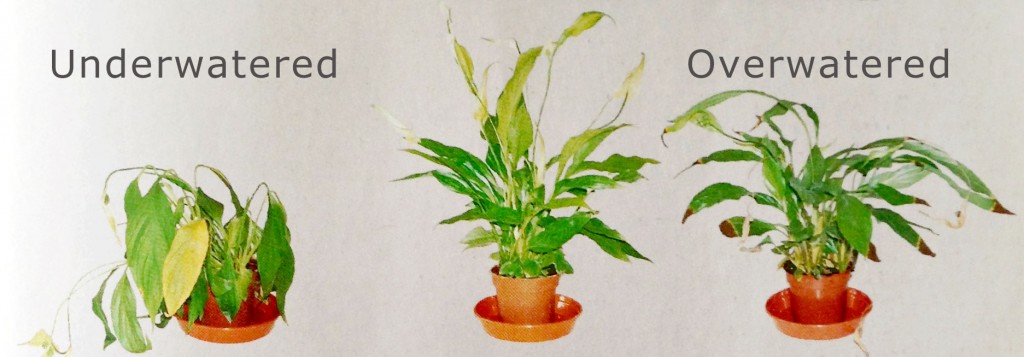
An overwatered and underwatered plant can look very similar - dying leaves. However, generally the brown dead leaves of an underwatered plant will feel crispy, whilst the brown dead leaves of an overwatered plant will still feel limp.

So, when to water? To work out it you need to water, poke your finger a few centimetres into the soil. If it's damp you don't need to water. If you water too much, the soil will not have enough oxygen in it for the roots to breath.

Binley has some good detailed information about saving overwatered plants.

Wednesday, 14 December 2016

Best travel money options for Australians


I have spent a lot of time overseas and settled on these as my top picks for ways of getting the most for my Australian dollar abroad.

Citibank Visa Debit Card

This will be on a Citibank Plus Transaction Account.
Pros:
  • No annual fees
  • Visa card bulk exchange rate
  • No commission on foreign currency purchases
  • No fees or commissions on foreign ATM withdrawals*
  • A huge international network of Citibank banks and ATMs. You can use these to withdraw money fee free in places where local banks impose charges.
  • You can set up an Australian account with citibank Australia from any country where you can access a Citibank branch. 
Cons:
  • No travel insurance associated with the card

Bankwest Zero Gold Mastercard

Pros:
  • No annual fees
  • Mastercard bulk exchange rate
  • No commission or fees on foreign currency purchases
  • Free automatic travel insurance when you purchase travel tickets in advance on this card (there are certain conditions that apply - so make sure you fully understand them in the fine print to ensure that you are actually insured)
Cons:
  • You will be charged a fee/commission by Bankwest if you get a cash advance at a foreign ATM*

Honorable Mention: Latitude 28 Degrees Travel Card

Pros:
  • No annual fees
  • Mastercard bulk exchange rate
  • No commission or fees on foreign currency purchases
Cons:
  • You will be charged a fee/commission by Latitude if you get a cash advance at a foreign ATM*
  • No travel insurance


* Foreign banks may impose a fee for using their ATM. In some countries all banks charge. In some countries none do. And in other countries some banks charge while others don't.

Tuesday, 8 March 2016

Work Coordination Manual for Community Organisations and Ecovillages

As a community development worker and especially since co-founding the Bellbunya Community, I have been interested in the way workload and responsibility naturally seems to distribute itself in voluntary organisations. It appears to me that, in general, a small group of overworked people tend to carry the majority of the responsibility. At the other end of the spectrum, another small group of people rarely get beyond good intentions when it comes to sharing the workload and responsibility. The majority of people are willing to contribute as long as there is someone to coordinate and tell them what to do. As one of the small, overworked group at the centre of things, I have spent a lot of time wondering about how to more evenly distribute workloads and responsibilities, to make things more efficient and enjoyable and avoid resentment and burnout.

This downloadable document represents the best of my thinking so far and builds on a model used by the Americana Leadership College and explained to me by Paul Mischefski. It provides effective tools for simplifying coordination of tasks across numerous dimensions and for supporting people who would normally be followers to gradually and safely take on higher levels of coordination responsibility.

The system that I explain here is no silver bullet but, if applied diligently, it makes a big contribution towards a more equal sharing of the load. I provide examples from my community which you are welcome to adapt to your own needs. Its greatest weakness, as with all systems, is that it won't work unless people actually use it.

Download the Work Coordination Manual for Community Organisations

Saturday, 6 February 2016

Colours of Empowerment - A Simple Tool for Effective Meeting Facilitation

In meetings, how do we make sure that topics flow, that everyone is heard, that everyone understands the topic before discussion about the topic happens, that frictions that may arise in the group do not prevent it moving forward, etc? And what if no-one is comfortable or highly skilled in facilitation?


The larger the group and the more complex the topic the more inefficient a meeting can become. This is because our traditional approach of raising your hand and waiting your turn before you speak does not recognise the multidimensional nature of meetings. A skilled facilitator can greatly help but, even then, will occasionally miss something.

Remember meetings you've been in where people are debating a controversial topic and lots of people want to speak. Lots of opinions and arguments are put forth and the fourth person to speak couldn't understand some key elements of the initial concept. So, everything from the initial point onwards has been lost in understanding and needs to be re-explained once the initial understanding is clarified.

Colours of Empowerment to the rescue! We started using this process for the complex and busy meetings in the early days of setting up the Bellbunya Community to ease the pressure and seemingly endless discussion on so many topics. It worked.

How it Works

1. Everyone participating in the meeting receives a set of five coloured cards, as listed below (in priority order):

  • Red - Process. There is a process issue - e.g. The discussion has gone off topic or over time. We need to stop and reassess.
  • Orange - Acknowledgement/ Emotions. To acknowledge emotions (my own or those I sense in the room) - e.g. expressing appreciation, recognising anger or tension or hurt feelings in the room.
  • Yellow - Clarification. I want to ask a question to help me understand (gain clarity) about what is beeing discussed.
  • Green - Information. I have information that could help others in the mtg understand.
  • Blue - Opinion/ Comment / Idea. I have an idea or opinion to share.
It's good to create coloured cards with the words in bold written on the back to help jog meeting participants' memories. It is also good (especially whilst learning how to use the system) to have a poster on the wall, listing the cards in priority order that meeting participants can see during the meeting.

2. Whenever someone wants to speak or ask a question, they simply hold up the coloured card that indicates the category of what they wish to say.

3. The facilitator gives the next opportunity to speak to whoever is holding up the highest priority card, regardless of the order in which cards are actually held up. Red is highest priority and Blue is lowest priority. So, if, for example, there is someone holding up a blue card, another person holding up a yellow card and another person who later holds up a red card then the red card holder gets to speak first. The blue card holder only gets to speak if there are no cards of any other colour being held up.

Benefits

The Colours of Empowerment bring everyone along at the same pace. In a meeting, we can only progress at the rate of the slowest person and this process makes sure no one gets left behind. We give priority to making sure we are firstly on topic/time (red) and then that emotional needs arising within the meeting are being met (so that they don't get in the way of the process) (orange) and then making sure that everyone's understanding is clear (yellow and green) so that everyone can engage in the sharing of opinions/ideas etc (blue).

This system is not only faster and more efficient than the traditional system, it also:

  • Makes a meeting much easier to facilitate because people are showing what is going on for them with the coloured cards, rather than the facilitator trying to perceive what is happening. This produces good results and makes it less scary for inexperienced facilitators. Group members will help the facilitator by pointing out (for example) a red card that the facilitator has not noticed.
  • Increases group participation. 
  • Democratises the running of meetings through reducing dependence on a skilled facilitator, increasing participation of all people at the meeting and enabling less experienced/skilled people to step up and faciliate
  • Encourages quieter people by providing a level of non verbal communication that validates a whole range of different states.
  • Facilitates greater connection through enabling the sharing of emotional content effectively.


Saturday, 12 December 2015

3 Season Growing Calendar for South East Queensland and North Coast New South Wales

In the subtropics (especially SE Queensland and Northern NSW in Australia) people sometimes talk of three growing seasons (or 3 "summers") - tropical summer, European summer, Mediterranean summer. Each "summer" is perfect for growing the classic crops of those areas. This model has helped me better understand our growing seasons. We generally use it in my community (Bellbunya).

This page is incomplete and I will keep adding to it over time

Three Growing Seasons Summary

Tropical - hot, humid, wet. Summertime, after the rains start our wet season (usually by November/December, but has been late in recent years) until March/April when things cool down. Insects and fungal disease will destroy European and Mediterranean vegetables so grow tropical substitutes. Grow what they grow in South East Asia: tropical beans, sweet potato, ceylon spinach, Brazilian spinach, cassava, taro, pumpkin/melons, yakon, arrowroot, ginger/tumeric.
Cool temperate (North European Summer) - starts in Autumn (March/April) until the dry warm air (about August/September) as it cools and rains reduce. Grow what they grow in northern Europe: lettuce, brassicas (Broccoli, Brussel Sprouts, Cabbage, Calabrese, Cauliflower, Kale, Kohlrabi, Mustard, Oriental Brassicas, Radish, Swede, Turnip), bok choi, carrot parsely, coriander, tomato, potato, broad bean, sweet peas
Mediterranean Summer - dry air, warm winds. Generally starts about August/September. You need to water (and protect the gardens from digging bandicoots). Grow what they grow in the Mediterranean: cucurbits (Pumpkin, Cucumber, Zuchini, Melon), tomato, eggplant, capsicum, corn, beans.

Tropical (SE Asian Summer)

What: Hot, humid, wet.
When: Summertime, after the rains start our wet season (usually by November/December, but has been late in recent years) until March/April when things cool down.
Issues: Insects and fungal disease will destroy European and Mediterranean vegetables so grow tropical substitutes. Think of what is grown in SE Asia.

Seasonal Tasks:
Fertilise the entire garden with an organically based fertiliser.
Watch out for caterpillars on citrus, impatiens and white cedar.


Plant:
Ceylon spinach (sow direct, vine on lattice, perennial - ensure replacement crop is mature before removing old crop, salad or stir fry)
Brazilian spinach (sow direct, pereneal - ensure replacement crop is mature before removing old crop, salad or stir fry)
Cassava (should have planted in October to harvest in May)
Arrowroot / Cana (plant rhyzomes (?) (shoots with part attached tuber), matures after???, harvest for tubers, peel and cook as a potato substitute)
Madagascar Beans Phaseolus lunatus: This perennial vine produces bountiful crops of beans. Use them fresh as a substitute for broad beans or use the shelled dried beans, cooked in soups, stews and vegetable burgers!
Turmeric (Curcuma domestica), Ginger (Zingiber officinale), Galangal (Alpinia galangal): All three of these common spices find their way into food we eat, yet few people grow their own fresh supplies. Start with a rhizome purchased from an organic market or green grocer. Simply plant out in the garden and harvest garden fresh rhizomes whenever you need them.
Taro Colocasia esculenta: The large, attractive leaves of the taro plant look great in a tropical garden. Plant it where the soil is moist or plunge potted specimens into a pond. One tuber multiples quickly, producing young tubers that can be cooked like potatoes. The easiest way to ensure you get a sweet, edible variety is to buy your planting stock from the supermarket or green grocer.
Peruvian Parsnip Arracacia xanthorrhiza: This root vegetable from South America produces long, cream-coloured, parsnip-like roots. You can also harvest the tops as a green vegetable or garnish. Propagate from root cuttings.
Water Chestnuts Eleocharis dulcis: Few plants are more productive with one corm producing 50 new chestnuts in one season! Turn you pond into a productive food garden.
Yacon Polymnia sonchifolia: Also known as sweet root, this hardy plant produces large sweet potato-like tubers that are crisp and juicy. Extremely productive, its grows easily from stem cuttings or vegetative tubers.
Perennial Coriander: As the heat of summer approaches, annual coriander quickly goes to seed and dies. Not so, the perennial coriander. This low growing perennial produces dandelion-like leaves and prickly seed heads. Keep removing the seed heads as they form if you want greater leaf production. Perennial coriander has a stronger flavour than annual coriander, so you only need a few leaves to provide that great taste.

Summer salad greens - dandelion chicory, nasturtium, green elk, minuba, mizuna, watercress, perennial sorrel
capsicum (sow direct or seed trays, r3 fruity, solanaceae/nightshade, detail),
choko (plant shooting fruit to grow on fence/shed),
cucumber (sow direct, r3 fruity, cucurbit family, detail),
eggplant (sow direct or seed trays, r3 fruity, solanaceae/nightshade, detail),
lettuce (easy, sow direct, r2 leafy, daisy family, detail),
okra (seed tray, r3 fruity, hibiscus family),
pumpkin (easy, sow direct, r3 fruity, cucurbit family, detail),
radish (easy, sow direct, r4 rooty, brassicaca family),
rockmelon (seed tray, r3 fruity, cucurbit family),
rosella (sow direct, r3 fruity, detail),
snake bean (easy, sow direct, r1 leggy),
sweet corn (sow direct, r3 fruity, detail),
sweet potato (plant cuttings, r4 rooty, detail), also non running sweet potato (Ipomoea babatus)
cherry tomato (seed trays, r3 fruity, solanaceae/nightshade,detail),
watermelon (seed tray, r3 fruity, detail),
zucchini (seed tray, r3 fruity)

Cool temperate (North European Summer)

What: cool, not so wet
When: Starts in Autumn (March/April) as it cools and the wet season ends until the dry warm air (about August/September) .
Issues: less insect activity, great for growing traditional European vegetables, especially brasicas.

Grow what they grow in northern Europe: lettuce, brassicas (Broccoli, Brussel Sprouts, Cabbage, Calabrese, Cauliflower, Kale, Kohlrabi, Mustard, Oriental Brassicas, Radish, Swede, Turnip), bok choi, carrot parsely, coriander, tomato, potato, broad bean, sweet peas

Seasonal Tasks:
Slowed growth during winter provides an opportunity to tackle major landscaping projects like making new garden beds, paving, constructing pergolas or building retaining walls. Small chance of occasional frost. Generally rain should have finished by April but in recent years it's gone until end of June. Attention should be paid to making optimum use of scarce water resources.
Fertilise fruit trees, citrus, passionfruit, native plants and emerging bulbs, then water well.
Plant sweet peas, strawberry runners, seedlings, bulbs, trees and shrubs.
Trim plants that have become too rampant over summer.
Raise the cutting height of your mower in preparation for winter.
Lift, divide, propagate and replant herbaceous perennials.
Plant deciduous trees, shrubs, frangipani cuttings, roses.
Prune deciduous plants and swollen gall wasp stems on citrus, roses.
Relocate poorly positioned trees and shrubs to new areas.
Control bindii weed in lawns (look like carrot leaves) to avoid painful burrs during summer.

Harvest:
Cassava (plant (October) sections of stem including 2 or 3 nodes, harvest (May) as will not grow any more this season and gets woody with age. Harvest by removing entire plant, peel roots/tubers and remove dark areas (toxic). Cannot be stored as toxins (black areas) will grow. Cook like potato - best to steam then bake. After harvesting, cut stem into 6 inch sections and store in slightly damp sawdust until they sprout (October) and can be planted)

Plant: (months just give approximate idea)
March: carrot, cauliflower, French beans, leeks, lettuce, silver beet, spring onion & radish, capsicum, cucumber, eggplant, potatoes, sweet corn, sweet potato & tomato
April: beetroot, broccoli, cabbage, carrot, cauliflower, celery, lettuce, radish & spring onion, Brussels sprout, capsicum, endive, French beans, garlic, kohl rabi, leeks, onions, potatoes, silver beet, spinach, sweet potato & tomato
May: broccoli, cabbage, cauliflower, carrot, kohl rabi, lettuce, radish, silver beet, spring onion & turnip, beetroot, broad beans, Brussels sprout, capsicum, celery, chicory, endive, French beans, garlic, leeks, onions, parsnip, peas, potatoes, spinach, swede, sweet potato& tomato
June: carrot, cauliflower, kohl rabi, lettuce, radish, spring onion & turnip, beetroot, broad beans, broccoli, cabbage, capsicum, celery, endive, French beans, garlic, leeks, onions, parsnip, peas, potatoes, silver beet, spinach, swede, sweet potato, tomato
July: carrot, kohl rabi, lettuce, radish, spring onion & turnip, beetroot, broccoli, cabbage, capsicum, celery, endive, French bean, garlic, leeks, peas, potatoes, silver beet, swede, sweet potato, tomato.
August: kohl rabi, lettuce, radish, beetroot, carrot, capsicum, celery, cucumber, eggplant, French beans, okra, potatoes, pumpkin, silver beet, spring onion, squash, sweet potato, tomato & zucchini

Warm Dry (Mediterranean Summer)

What: dry air, warm winds.
When: Generally starts about August/September and goes until the rainy season hits - hot and humid (usually November/December but has been late in recent year - could be February).
Issues: You need to water (and protect the gardens from digging bandicoots). Grow what they grow in the Mediterranean: cucurbits (Pumpkin, Cucumber, Zuchini, Melon), tomato, eggplant, capsicum, corn, beans.

Seasonal Tasks:
Prune fruit trees?
Fertilise bulbs, pawpaws, citrus and water well.
Protect seedlings from snails and slugs with non-toxic, iron based baits.
Repot and fertilize indoor plants.

Plant: (months just give approximate idea)
Cassava (plant (October) sections of stem including 2 or 3 nodes, harvest (May) as will not grow any more this season and gets woody with age. Harvest by removing entire plant, peel roots/tubers and remove dark areas (toxic). Cannot be stored as toxins (black areas) will grow. Cook like potato - best to steam then bake. After harvesting, cut stem into 6 inch sections and store in slightly damp sawdust until they sprout (October) and can be planted)
September: carrot, choko, cucumber, eggplant, French beans, lettuce, radish, spring onion, squash, tomato, beetroot, capsicum, kohl rabi, okra, pumpkin, rockmelon, rosella, silver beet, sweet corn, sweet potato, watermelon, zucchini
October: capsicum, choko, cucumber, eggplant, French beans, lettuce, okra, pumpkin, radish, spring onion, tomato & zucchini, rockmelon, rosella, squash, sweet potato & watermelon, sweet corn
November: capsicum, choko, cucumber, eggplant, lettuce, squash, sweet corn, sweet potato, radish, snake beans, tomato, zucchini, okra, pumpkin, rockmelon, rosella, spring onion, & watermelon

Thursday, 10 December 2015

Happiness

Conspicuous consumption. Body image issues. Overwork. Stress. Unemployment. Need to get ahead. Financial insecurity. Cram school. Global financial crisis. Climate change. Family breakdown. Peak oil. Xenophobia. Lack of time. Suicide. Drugs. Gangs. Suicide bombers and fear of terrorism. Loneliness and social isolation. Racism. Disconnected neighbourhoods. Affluenza, Most of the media and politicians of my home country (Australia) are pedaling values and attitudes that generate unhappiness.

Fortunately, there is growing interest in true happiness (and I don't mean pleasure; I mean an ongoing feeling of deep connectedness and "okayness" that can also incorporate times of sadness and grief without becoming depression). Research shows that key contributors to deep, lasting happiness include:
  • continual personal growth (and choosing to view challenges as opportunities to grow)
  • strong personal relationships - friends and family
  • Helping others/acts of kindness without any expectation of return (generosity)
  • Doing things that are meaningful (in relation to my values)
  • Being appreciative /grateful
Activities to increase your deep level of happiness:
  • Regular (as often as possible) loving kindness mediation. It only takes a few minutes. Try this simple loving kindness meditation to start you off.
  • Perform random acts of kindness for others, especially anonymous ones.
  • Be intentionally appreciative: for example, each Sunday night share 5 things that you are grateful for from the week that has just been. Better still, do it each morning when you wake up.
  • Write down your own personal values and ask yourself of simple things you can do to live more in line with these values.
  • Do the exercises on the Making Australia Happy website.
  • Learn and use the Quick Coherence technique - it is quick and simple -> heart focus, heart breathing, heart feeling
Viewing:
  • Watch Making Australia Happy - ABC TV series
  • Watch "Happy" a 1hr documentary - by Roko Belich
Websites:

Tuesday, 8 December 2015

The best free crowdfunding tools for good causes

I was in Nepal in 2015 to support the Global Ecovillage Network response to Nepal's devastating earthquakes. I got involved with a great, local NGO called Nexus Culture Nepal, which, like most NGOs, needed funding. So, I researched crowdfunding tools and found that some of the best are actually free.

All crowdfunding websites can receive donations via credit card from anywhere in the world. However, there will be some restrictions on what countries they can pay to, due to different laws in every country.

Chuffed
Australian based Not For Profit. Crowdfunding platform for social causes - funds can go to individuals or organisations of any type (including companies). Chuffed does not charge any fees. However, credit card fees are charged by the credit card processor (about 2-3%). The project to be funded can be in any country. However, the person, organisation or company running the fundraiser should be from Australia, US, UK, Canada, the Netherlands or Belgium. Funds will be transferred to your bank account in Australia, USA, UK or Europe. For other regions you need a paypal account. They now also have an office in the UK.

Betterplace
Philanthropic project of a German software company. Charge no fees and pay all the credit card processing fees themselves. They even have a network of philanthropists who may provide additional financial support to your project. Will send money anywhere in the world, however, if you are not a registered charity in Germany you can only receive up to 2,500Euros per quarter in donations.

Youcaring
USA based crowdfunding site. You will receive the donations (via stripe, wepay or paypal). They seem to be open to other countries running fundraisers direct, which then depends on if you can get your own paypal, stripe or wepay account to work in your country. Youcaring charges no fees but the payment gateway (paypal, stripe, wepay) will take 3% or so.

Generosity
USA based crowdfunding platform by Indiegogo, one of the biggest crowdfunding companies. For individual and social causes. No fees except the credit card fee charged by the payment processing gateway. According to the website, in most cases, a donation to a personal fundraiser is considered a gift and not taxable income to the campaign owner (but best to check with an accountant).

Communities by Bendigo Bank
Available for Australian projects, there are no charges except the credit card processing fee of 1.5%, which is the lowest of all the platforms. You must open a Bendigo Bank account to be able to receive the fnds.

Crowdzilla
UK based charity Provides financial support, through on­line crowdfunded donations, to local businesses in the developing world with the aim to promote growth, education, and training to local communities and generate employment and new services.

Grassrootz is a bit newer and provides free tools for receiving donations and selling tickets for fundraiser events.

Long walks / pilgrimages of the world

I have discovered that walking is one of the most powerful ways for me to truly experience a country and its people - the longer the better. I love the simplicity of life, the experience of community with other long distance hikers and the spiritual journey. There is an incredible freedom that comes with choosing to pare back ones possessions (as Peace Pilgrim said "Anything that you own that you don't absolutely need is a burden." and this becomes very evident when you have to carry it on your back day after day). I will gradually expand this list as I discover more long walks in different countries...

Australia

Generally, all tracks require you to be self sufficient, with food, tent, maps and compass and good navigation and survival skills. Trails may be unmarked and/or overgrown in areas. Long tracks go through remote country. You will often need to arrange food drops in advance and be very aware of water resupply opportunities.
Costs: You will usually require camping permits for national parks you pass through at about USD$3/day plus food costs. Also, arranging food drops can be a significant cost, depending on how remote they are.

  • Bicentennial National Trail - 5330kms from Cooktown in north Queensland to Healesville near Melbourne. It's one of the longest trails in the world.
  • Bibbulman Track - 1003kms Along the south west coast of West Australia
  • The Overland Track - 73kms in Tasmania. I have included it because, although short, it is one of the most beautiful tracks in the world.
For more long walks in Australia, see John Chapman's list and the Wikipedia list.

New Zealand

Te Araroa - 3000km route from Cape Reinga in the North of New Zealand to Bluff in the South
New Zealand's Trail. Takes in spectacular New Zealand landscapes, from beaches to volcanoes to forests to cities.

USA

Walking the Appalachian trail transformed my view (positively) of the USA. I reckon it's the best country for long distance walking, in nature. Locals are friendly and supportive. It's often possible to resupply on route by hitching a short distance off the trail.
Costs: Generally, there are no fees or permits required on for thru hikers on the long trails but check first. So, all you will need to spend money on is food and replacing worn gear (eg shoes) and an occasional hostel if you want to take a break off the trail and have a shower. Budget about USD$10/day if you are doing a full long trail.
  • Appalachian Trail (AT) 3,500kms in Eastern United States, from Georgia to Main National park Free camping Walk between March and October. Can walk without any advance food resupply arrangements - by hitching off the trail into a town every week or so.
  • Pacific Crest Trail (PCT) 4,286 km bordering the Sierra Nevada mountain range, west side of USA. USA/Mexico border to Canada, passing through 25 national forests and 7 national parks. There is also a corresponding bike trail that runs parallel to the Pacific Crest Trail for 4,000 km.
  • Continental Divide Trail (CDT) 5,000 km between Mexico and Canada following the Continental Divide along the Rocky Mountains and traversing Montana, Idaho, Wyoming, Colorado, and New Mexico. The "Triple Crown" is the achievement of hiking the full length of the 3 trails - PCT, AT and CDT.
  • John Muir Trail 358km in the Sierra Nevada mountain range, from the Yosemite National Park to Mount Whitney. Best time to visit is from July to September, though snow may still linger on the higher passes. Free camping. Carry own tent and food.
  • For more long walking trails in the USA, see the Wikipedia list

Spain


Camino de Santiago de Compostella Pilgrimage - 800 kms from France to Santiago de Compostella in Spain. Many alternative routes and possible starting points much further afield. Lots of road walking through towns and villages. Lots of relatively cheap pilgrim accommodation available and meals.

Canada

Bruce Trail - 850km from Niagara to Tobermory, with side trails extending out to 250km.

Israel

Israel National Trail - 990kms.

Japan

Shikoku Pilgrimage - 1,400km Accommodation in small, family-owned inns for 4,000-8,000 yen per night (depending on if you’d like food with your stay).

United Kingdom

Cotswold Way - 162km from Chipping Campden in the north to the city of Bath, a UNESCO World Heritage site.

Other Countries

Wikipedia has an extensive list of long distance trails by country.

Tuesday, 30 September 2014

My Italian Pilgrimage - 800kms Italy to Nice in 2014

In August-September 2014, I walked from Assisi in Italy to Nice on the French Italian border. It is part of a longer pilgrimage I intend to complete one day, which will continue on to Santiago de Compostella, in Spain, another 2000kms or so.

This is the route I walked. Distances are for walking, along minor dirt or paved roads and forest paths. Distances are not direct but often through other scenic spots.

From Assisi to La Verna is the reverse of a popular pilgrimage route (the via di Francesco - a route that Francis of Assisi walked). From Siena north, I walked along the via Francigena (again in reverse) to Sazarna, changing across to the Via del a Costa until I reached Nice, in France. Exactly 800 years ago, Francis of Assisi walked a similar route to Santiago de Compostela. (There are Italian language guidebooks to these routes available in Italy).


I made a number of audio posts and video posts for family and friends (although I found the video posts too large to load easily, so didn't make many of them).
audio log or video log

Photos from stage 1 - the Via Francesco This was the first stage of my pilgrimage - from Assisi to Florence - the reverse direction of the pilgrimage route called the Via di Francesco (from LaVerna to Assisi). Click here to see the photos. From early August.

Photos from stage 2 - Via Francigena Late August 2014 I walked a section of the Via Francigena - from Siena to Sarazana (just over 200kms). This is the second stage of my pilgrimage from Asssisi to Santiago de Compostela. The full Via Francigena runs from Canterbury in England to Rome. I met three people who were walking the full VF. Click here to view photos

Photos from stage 3 - the via della Costa The third stage of my pilgrimage - about 300kms from Sarzana to Ventimiglia, near the French border. Once at Ventimiglia, it was a delight to spend 12 days at the ecovillage Torri Superiore. Click here to view photos

Various pilgrim emotions Well, there are plenty more - but here's a sample. Click here to see photos

Thursday, 2 January 2014

Awakening the Dreamer


Yesterday I was blessed to be able to run an "Awakening the Dreamer, Changing the Dream" symposium at Bellbunya for our volunteers and guests. A couple of nights before that I had woken up in the middle of the night buzzing with the inspiration of a new idea - to run these workshops as a free offering for our volunteers and guests (and locals): a perfect synergy with our values. Six months before that I had participated in my first symposium and came away inspired and re-energised, with a renewed commitment to making a difference in our world. And three years before that I had stumbled across the symposium's vision via a group we hosted at Bellbunya. I was struck by the power and balance of that vision: "Bringing forth an environmentally sustainable, spiritually fulfilling, and socially just human presence on this planet."

The Changing the Dream Symposium, is a not-for-profit initiative designed as a response to the urgent call of the Amazon Achuar people to "change the dream" of the modern world. Here at Bellbunya, we see so many people (including ourselves) who are disturbed by the "dream" of our modern world and who are seeking something different. At Bellbunya, we are learning/experimenting/growing in living an alternative dream of holistically sustaining living.

The symposium is designed to help people connect with their own deep concern for our world and its people whilst empowering them to make a difference in their own unique way. It is a beautiful opportunity for those who stay with us to deepen their experience at Bellbunya and grow in their commitment to building a better world.

And so, I have committed myself to run this 4 hour workshop as a free opportunity to add to the contribution that Bellbunya is making to building a better world. Whenever we have six or more volunteers, guests, neighbours or interested people from anywhere who want it, I will gladly run a symposium. If you want to come along to one, just let me know.

Have a look at the video below for a brief intro to the symposium


If you are not near Bellbunya, you can find a symposium near you at www.uptous.org/symposium

Saturday, 14 December 2013

The Clean 15 vs. The Dirty Dozen

 Want to know what non-organic produce uses the least pesticide and what uses the most? Let's see.


The Clean Fifteen :)
- Top Produce with the Least Pesticide    

1. Onion
2. Avocado
3. Sweet Corn
4. Pineapples
5. Mango
6. Sweet Pea
7. Asparagus
8. Kiwi Fruits
9. Cabbage
10. Eggplant
11. Cantaloupe
12. Watermelon
13. Grapefruits
14. Sweet Potato
15. Sweet Onion
The Dirty Dozen :-(
- Produce with the highest Pesticide Residue

1. Celery
2. Peach
3. Strawberry
4. Apple
5. Blueberry
6. Nectarine
7. Capsicum
8. Spinach, Kale, Collard Green
9. Cherry
10. Potato
11. Grape
12. Lettuce

*The Dirty Dozen* are reported to contain 47-67 Pesticides per serving!

Other items with high pesticide residue include fatty meats, milk, chocolate, wine and coffee.

Thursday, 9 May 2013

The Paradoxical Commandments of Leadership

The popular and beautiful poem by Mother Theresa is a reworking of the original by Kent Keith, called the “Paradoxical Commandments of Leadership”:

1: People are illogical, unreasonable, and self-centered. Love them anyway.
2: If you do good, people will accuse you of selfish ulterior motives. Do good anyway.
3: If you are successful, you win false friends and true enemies. Succeed anyway.
4: The good you do today will be forgotten tomorrow. Do good anyway.
5: Honesty and frankness make you vulnerable. Be honest and frank anyway.
6: The biggest men with the biggest ideas can be shot down by the smallest men with the smallest minds. Think big anyway.
7: People favor underdogs, but follow only top dogs. Fight for a few underdogs anyway.
8: What you spend years building may be destroyed overnight. Build anyway.
9: People really need help but may attack you if you do help them. Help people anyway.
10: Give the world the best you have and you’ll get kicked in the teeth. Give the world the best you have anyway.

And here’s the later version by Mother Theresa…
Do Good Anyway
People are often unreasonable, illogical and self-centered;
Forgive them anyway.
If you are kind, people may accuse you of selfish, ulterior motives;
Be kind anyway.
If you are successful, you will win some false friends and some true enemies;
Succeed anyway.
If you are honest and frank, people may cheat you;
Be honest and frank anyway.
What you spend years building, someone could destroy overnight;
Build anyway.
If you find serenity and happiness, they may be jealous;
Be happy anyway.
The good you do today, people will often forget tomorrow;
Do good anyway.
Give the world the best you have, and it may never be enough;
Give the world the best you’ve got anyway.
You see, in the final analysis, it is between you and your God;
It was never between you and them anyway.

Sunday, 18 November 2012

Going Green in Sri Lanka


Chris, one of Bellbunya Sustainable Community's founders has been in Sri Lanka for the AGM of the Global Ecovillage Network Oceania and Asia and he has just visited Eco Community Sri Lanka...

The speedometer on the bus read 0km/h which didn’t seem too inaccurate as I alternated between roasting my rear end on the gearbox and standing. I was on my way to Eco Community Sri Lanka (ECSL), about 6 hours from the nation’s capital, Colombo.

Chaminda, one of the founders had responded enthusiastically to my request to visit and exchange our ecovillage insights and lessons.

Chris & Chaminda at the community kitchen - earth building & solar light
Eco Community Sri Lanka sits on 52 acres in the dry zone of central north Sri Lanka. When I visited there were about 12 community members onsite and 2 international volunteers. The community has been in place for only 1.5yrs and, from my research, appears to be the first ecovillage in the country that has been entirely created by its members, rather than being initiated by a program of an NGO. (However, if anyone knows of any other independently created ecovillages, please let me know).

The community was started by a group of friends, studying Chi Gong together under their teacher Aruna. Thilena contributed his savings from 5 years of factory work in Korea and Eco Community Sri Lanka was born.

Aruna describes their vision as "mutual completion" which is about working together to achieve shared goals. He believes that each person has a special "Universal Task" and that in finding and following this "task" we will be building a better world for all. Following this philosophy, Chaminda left his well-paid job as an NGO aid and development worker to volunteer fulltime at ECSL to make a "real difference".

A down side of the large amount of international development aid that Sri Lanka receives is a culture of financial dependence that sometimes develops in NGOs. In contrast, ECSL is entirely self funding. Community members have contributed their own resources and they have a number of farm-based businesses, with more in development. ECSL has 450 loman brown chickens, 1400 indigenous chickens (most are not yet at the point of laying eggs), 38 turkeys, 48 cows, 37 goats. They sell on average 3600 chicken eggs per week and 350 litres of milk. They have two plantations of 800 organic papaya trees, 60 cashew trees, hundreds of pumpkins and eggplants and, when the rains come, will plant rice.

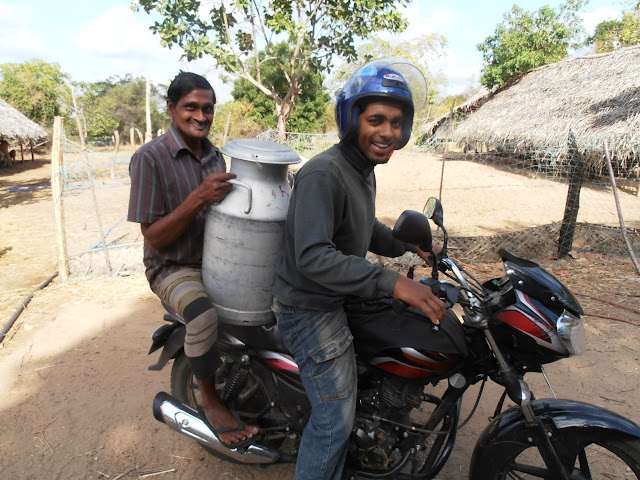
Taking fresh milk to the co-op
At this stage, much of the development is experimental, an ongoing learning and evolution process. For example, change will soon be made on the chicken front. The loman brown chickens are susceptible to disease and need to be kept in their barn. At the end of the dry season, feed for the chickens is costing more than their eggs are worth. However, the local chickens are disease resistant and can free range to feed themselves and their eggs (although less frequent) fetch double the price of the loman browns’.

Right now, everyone is hoping for rain. The paddy fields are bare. Other farmers have burnt their fields (they don't do this at ECSL) and are waiting to plant. The monsoon is now a few weeks late, which makes things very difficult. And it's not just for the farmers. Each night now up to 50 wild elephants come seeking food. Farmers try to scare them away from their homes and crops with fire crackers, yelling, bonfires and lights. It's dangerous and tiring but, at this time of year, it's a struggle for survival. These conflicts are common in Sri Lanka, as wild land for elephants to free range diminishes.

At ECSL, they are wondering how to balance the needs of people and nature. Stephanie, an Irish permaculture teacher from Auroville in India is developing a permaculture plan for the kitchen garden. A permaculture plan for the whole site would be great - trees, mulch and compost are particularly important.

Buildings are efficient - compact and made of local materials, with traditional mud walls and palm frond roofs. The community is off the grid, with a number of small solar panels providing for LED lights and a water pump.

Volunteer accommodation - natural earth building
One of the intentions of ECSL is to experiment and share useful technologies and lessons that they learn for the benefit of local subsistence farmers. For example, the community here has developed a natural pesticide, made from a number of local plants, that they have distributed to the neighboring farmers to try. They are also developing their organic papaya orchards to demonstrate to local farmers that they can be grown without chemical fertilisers or pesticides. As they develop their herds of cows and goats, they intend to develop a cow and goat bank system, including training and support, to assist local farmers.

The need for agrochemical-free farming was highlighted to me by the alarming level of kidney failure in Sri Lanka. Current research by the World Health Organisation shows a growing problem around the world - that began to emerge amongst poor rural farmers in the 1990s. It appears that ground water tainted with cadmium and arsenic from chemical fertilisers and pesticides are a key factor. Chaminda and the crew are trying to work out how best to assist the farmers in their area.

On the social level, sometimes ECSL volunteers teach English at the local school. They have also established and run the WWOOF (Willing Workers on Organic Farms) network in Sri Lanka.

As a small and new community, ECSL has achieved a surprising amount already. They are warm and welcoming and provide volunteers with a great opportunity to be a part of the life of a small rural community. They are open to new community members and volunteers (particularly if you have skills in website development or alternative technologies). For more information, go to http://ecocommunitylk.blogspot.com

Article by Chris Gibbings. Chris is co-founder of the Bellbunya Sustainable Community (www.bellbunya.org.au) on the Sunshine Coast in Australia and Vice President of the Global Ecovillage Network Oceania and Asia (http://genoa.ecovillage.org/).

Chris meeting with community members

Monday, 3 September 2012

Food and Sustainability

 I thought I would post some of the (at times shocking) facts that I learnt in Nepal from my amazing Canadian friend and nutrition teacher Wendy Akune. I will conclude with a post on how you can minimize your impact and monitor the affect your own nutrition on your moods, health and general well-being. Enjoy.

- In 1961 produce began to be shipped which signaled the end of predominantly local produce.

- In the US the average kilogram of produce travels more than 2400km from farm to plate.

-In the UK food travels 50% farther than 20 years ago.

- In Norway food travels 100% further than 10 years ago.

- On the average supermarket shelves there are roughly 30,000 products. Half of these are produced by 10 multi-national companies.140 people form the boards of directors of these ten companies.
That means 140 people controlling half the food in a large supermarket!!!

- 6 companies now control 98% of the world’s seed sales.

-Through consolidation-i.e mergers, takeovers and alliances, multi-national farms are now controlling the food system from gene to supermarket shelf.This Includes:
-Seeds
-Pesticides
-Grain Collection
-Grain processing
-Livestock production
-Livestock slaughtering; and
-Processed Food

Monday, 27 August 2012

Cassava

 Yesterday at Bellbunya a selection of guests, visitors and community members harvested our Cassava plants.


A perennial woody shrub, Cassava is a great source of low cost carbohydrate in tropical climates.

To plant (or re-plant), all you need is a small section (around 7-30 cm) of the woody shrub buried either horizontally or vertically and about 8 months of patience!

As cassava is actually grown for the tubular roots, harvesting requires pulling out the entire shrub, at which stage the cassava is re-planted in a different area. The soil from which they are pulled is now perfect for growing above ground crops such as broad beans.

To prepare the cassava for eating, we cut the roots into smallish section and with a sharp knife removed both the dirty outer layer along with the thin woody layer just below it. If the Cassava shows any signs of black or brown amongst the white of the root, make sure to throw it away, as this actually cyanide! Cassava only has a shelf life of a few days so it needs be cooked almost immediately. We par-boiled and then roasted ours, but there are many other ways it can be used.

http://www.hort.purdue.edu/newcrop/cropfactsheets/cassava.htm has suggestions on how to use Cassava:

Dried roots can be milled into flour. Maize may be addedduring the milling process to add protein to the flour. The flour can be use for baking breads. Typically, cassava flour may be used as partial substitute for wheat flour in making bread. Bread made wholly from cassava has been marketed in the U.S.A. to meet the needs of people with allergies to wheat flour.

Fresh roots can be sliced thinly and deep fried to make a product similar to potato chips. They can be cut into larger spear-like pieces and processed into a product similar to french fires.

Roots can be peeled, grated and washed with water to extract the starch which can be used to make breads, crackers, pasta and pearls of tapioca.

Unpeeled roots can be grated and dried for use as animal feed. The leaves can add protein to animal feed.

Industrial uses where cassava is used in the processing procedures or manufacture of products include paper-making, textiles, adhesives, high fructo

se syrup and alcohol.

Our cassava was (surprisingly) delicious and tasted somewhat like roasted chestnuts.